Use your MT5 EA on prop firms that block automation

ClickMimic is a desktop bridge that mirrors trades from your MT5 EA into xStation (XTB), cTrader and MT5 using on-screen clicks – so you can keep your automation even on accounts that don’t allow Algo Trading.

For prop firm traders, XTB users and anyone blocked by Algo Trading restrictions.

Live • Trade sources
MT5
Live • Targets
xStation (XTB) cTrader MT5 (even with Algo Trading off)
Start 7-day free trial Buy full version
MT5 → XTB (real execution)
MT5 → cTrader (real execution)
MT5 → MT5 (Algo OFF)
  • ✔ Works without API
  • ✔ Works even when Algo Trading is OFF
  • ✔ Setup in 2–3 minutes
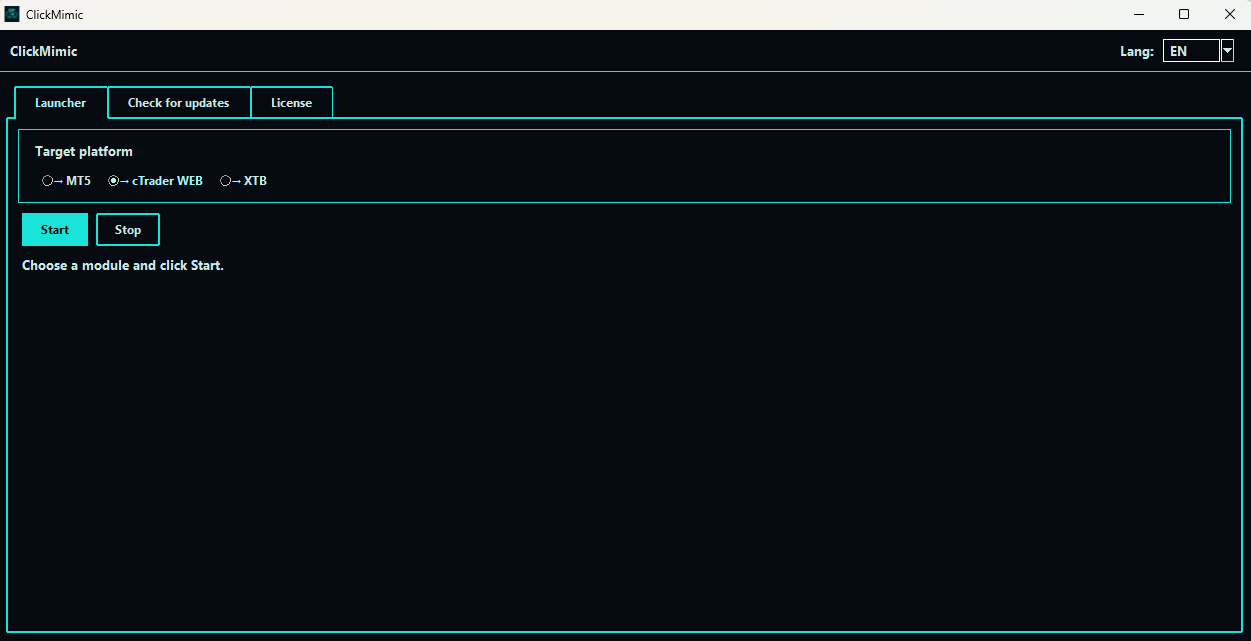
ClickMimic app screenshot

Real screenshots from ClickMimic.
Click the image to open it in full size.

Telegram (Trade source — coming soon) Discord (Trade source — coming soon) TradingView (Trade source — coming soon) TradeLocker (Target — coming soon) DXtrade (Target — coming soon)

How it works

  1. Step 1

    Set your target

    Pick where your trades should go: xStation (XTB), cTrader, or MT5.

  2. Step 2

    Quick setup (2–3 min)

    Run a short wizard: confirm the trading window, choose language and basic safety options. No technical steps needed.

  3. Step 3

    Start ClickMimic

    Hit Start and keep your platform open. Pause or stop anytime.

  4. Step 4

    Trade as usual

    We mirror your actions — including market and pending orders. MT5 target works even with Algo Trading off.

What you get

Fast, simple copying

Move trades without headaches.

Both market and pending

Place the orders you need, the way you like.

Timing under control

Run it only when you want. Pause anytime.

Friendly interface

Clear layout. No technical jargon.

What’s included

ClickMimic app + license

Installer for Windows and an activation key.

Quick Start (2–3 min)

One-page guide to run your first copy: open MT5, pick a target, press Start.

Quick demo video (60–90s)

A short video showing the first launch and copying a sample trade end-to-end.

User Manual

Full manual (PDF/HTML): options explained in plain English, tips & safeguards.

Feature cheat sheet

Labeled screenshots: which button does what (market, pending, pause, logs, etc.).

Safe settings template

Conservative defaults for a safe start. Import and adjust later as you wish.

Ready-made profiles

Starter presets for xStation (XTB), cTrader and MT5.

Test pack

Sample test data & a quick scenario to confirm everything works before you go live.

Built-in updater

In-app “Check updates” with change logs so you’re always on the latest stable build.

Support

Email help for setup & basic troubleshooting.

[email protected] • [email protected]

Optional: VPS guide

Short guide if you want copying to run even when your PC is off (optional).

Grandfathering policy

Buy once, keep your plan. If prices go up later, your original price stays for that plan.

Licensing options

Subscription

Flexible

Monthly, quarterly or annual. Support included while active. Cancel anytime.

  • Best for trying ClickMimic with minimal upfront cost
  • All minor and major updates included while subscribed
  • Grandfathering: your original price is preserved for that plan
  • Switch plans whenever you need

Lifetime license

Limited availability

One-time payment. Designed for long-term users. Offered in small batches to keep support quality high.

  • Pay once — keep using this product plan
  • Security & bug-fix updates included
  • Support and major updates for the first three months
Check availability

Note: Lifetime seats open periodically in limited quantities. Join our socials for batch announcements.

Pricing

Monthly subscription
Starting at €12/mo
Per device when buying 10 licenses.
  • Support & all updates while active
  • Grandfathering preserved
  • Cancel anytime
  • Cheapest option
Start monthly
Quarterly subscription
Starting at €32.4/qtr
Per device when buying 10 licenses.
  • Save ~10% vs monthly
  • Support & all updates while active
  • Grandfathering
  • Easy to switch to yearly
Start quarterly
Yearly subscription
Starting at €111/yr
Per device when buying 10 licenses.
  • Support & all updates while active
  • Grandfathering preserved
  • Save vs monthly & quarterly
Start yearly
Lifetime license
Starting at €169
Limited availability
Per device when buying 10 licenses.
  • One-time payment
  • Security & bug-fix updates
  • Support & major updates (first 3 months)
Buy Lifetime

Taxes may apply based on your location.

Affiliate program — creators welcome worldwide

We keep it simple and fair. If you run a YouTube channel, Discord, newsletter or forum — in any country or language — we’d love to talk.

What you get

  • Generous commissions with monthly payouts
  • Unique tracking links & simple dashboard
  • Custom coupon codes
  • Ready-to-use media kit

Typical questions

  • Payout schedule & methods
  • Cookie / referral window
  • Coupon setup & stacking rules
  • Dashboards & tracking links
  • Content guidelines and best practices

Currently looking for creators from:

USA/UK (EN), Poland (PL), Germany (DE), France (FR), Italy (IT), Russia (RU), China (ZH), Japan (JA).

Next waves we plan to add:

Spain (ES), Portugal (PT), Turkey (TR), Arabic-speaking (MENA), Hindi (IN), Ukrainian (UA).

i

Access to your media kit

Once your application is approved, you’ll unlock your full affiliate media kit inside ClickMimic Hub.

For general product support write to [email protected] or [email protected].

FAQ

What do I need to start?

A Windows PC, MT5, and your target platform open.
(Optional) A VPS if you want copying to run even when your PC is off.

Is there a trial?

Yes — a 7-day trial. It’s available when you choose the Monthly 1-device plan on the buy page.

Do I need any coding skills or to modify my EA?

No. You don’t need to write code or edit MQL5 yourself. We provide a ready-made helper EA and a simple signal file format. For most users it’s enough to attach our EA in MT5, follow the Quick Start guide, and let ClickMimic handle the rest. Our helper EA does not contain a trading strategy or signals – it only writes your existing trades into a local .txt file for ClickMimic to read.

Do you offer support?

Yes. We are here to help you get set up.
Email: [email protected] or [email protected]

Can I stop it anytime?

Yes. You are always in control.

Do you plan more sources/targets?

Yes. Trade sources: TradingView and Discord (coming soon). Targets: TradeLocker and DXtrade (coming soon). We already support xStation (XTB), cTrader, and MT5 (even with Algo Trading off).

What languages do you support?

Currently translated: EN, PL, DE, FR, IT, RU, ZH, JA.
Planned next: ES, PT, TR, Arabic (MENA), Hindi (IN), Ukrainian (UA) and more.

Do you have more detailed questions?

Our full FAQ goes deeper into setup, calibration, licensing, trial, refunds, compliance with brokers & prop firms and technical behaviour.
You can read it here: ClickMimic — full FAQ.